Ore Factory Squad Beginner Guide: First Factory Route
Ore Factory Squad beginner guide for the first warehouse, property purchase, mining loop, contracts, and early upgrades on Steam.
First Hour Route
Ore Factory Squad beginner guide play should build one complete loop before chasing every unlock. The official Steam listing identifies the game as App ID 4210580, released on July 16, 2026, and describes a co-op mining and factory-building game where players start from a small warehouse, buy properties, dig for resources, process what they extract, and turn it into profit. That is the first-hour route: warehouse, property, mine, processor, storage, contract or sale.
Start by treating the warehouse as the center of the save. Walk the space, decide where raw resources should arrive, and leave a clear lane for pallets, forklifts, and later truck loading. Then buy or enter a manageable property and dig only enough material to test the first machines. A giant early pile looks productive, but it hides the question that matters: can the factory turn that material into an item a contract or sale system recognizes?
| First-hour step | Goal | Stop when |
|---|---|---|
| Warehouse check | Find intake, machine, storage, and loading space | You can walk the route without moving clutter |
| Property trip | Gather one useful batch from a simple route | Inventory or hauling slows the next action |
| Processing test | Confirm raw material becomes the expected output | One finished item reaches storage |
| Income choice | Use a small sale or a contract to fund progress | The next upgrade target is clear |
This page uses the official Steam page https://store.steampowered.com/app/4210580/Ore_Factory_Squad/, the advanced tips transcript https://www.youtube.com/watch?v=1ytzBkHV6qE, and the first-look start transcript https://www.youtube.com/watch?v=TFyDSqFDBBY as its evidence base.
Warehouse Before Mining
New players often start by digging too much. Ore Factory Squad rewards mining, but it also asks the player to process, store, and deliver. Before the first serious mine run, set a simple warehouse shape. Put raw input where returning players naturally enter, machines where their outputs can be checked, and finished goods where contract preparation or sale decisions happen. The layout does not have to be elegant; it has to be readable.
The official page supports conveyor-based production system, multi-stage production, pallets, forklifts, and smart warehouse robots. Those systems arrive as the factory grows, but the beginner principle appears immediately. Every item should have a next destination. If raw ore sits in one pile, processed goods in another, and contract goods near the loading path, later automation has a structure to improve instead of a mess to reinterpret.
| Warehouse zone | Beginner use | Later upgrade path |
|---|---|---|
| Raw intake | Drop mined material in one predictable place | Feed a conveyor or machine input |
| Machine area | Process one known recipe at a time | Add licenses, recipes, and extra machines |
| Finished buffer | Keep contract-ready goods separate | Assign robots or dedicated pallet staging |
| Loading lane | Leave room for forklifts and trucks | Prepare deliveries without rebuilding |
If playing solo, keep the layout compact because one person handles every handoff. If playing co-op, agree on zones before everyone starts moving items. The Steam listing supports solo or up to 4 players, so the same save can feel very different depending on how many hands are available.
Property and Digging
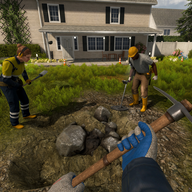
The official feature list says every property has procedurally generated underground resources with no fixed paths. It also names small backyards, big construction sites, forest areas, and large quarries on snowy mountains as property examples. For a beginner, that means the best first dig is not a memorized map. It is a short, repeatable route that brings back material the first factory can use.
Start with the basic tool path: shovel first, then pickaxes for tougher layers, then jackhammers and dynamite after progression makes them sensible. Do not use stronger tools just because they are available. Use them when a known layer or route is slowing the loop. The goal of the first property is proof: you can dig, return, process, and make a small income without losing track of the route.
| Digging choice | Beginner rule | Reason |
|---|---|---|
| Tunnel direction | Make a route you can find again | Procedural layouts punish random wandering |
| Tool upgrade | Buy when the current layer wastes time | Stronger tools should solve observed friction |
| Depth | Go deeper when hauling and processing can keep up | Valuable resources still need a factory path |
| Dynamite | Use after planning the opening | Blind blasts can make navigation worse |
When you return, do not immediately sprint back underground. Watch the factory consume the material. If the machine waits for a different input, your next mining target changes. If finished goods pile up, the contract or sales side needs attention.
Contracts and Cash
Contracts are the first system that turns a beginner factory into a planned operation. The Steam page says companies request specific products and quantities, and that players negotiate deals, prepare deliveries, and load trucks for higher rewards. The reviewed advanced tips transcript also supports a key economy lesson: repeated bulk stock sales are less stable than making contracts the income base once the factory can supply them.
Early on, accept only contracts that match your current line. If the order wants a product your machines cannot yet make, skip it even if the payout looks exciting. A low-risk order that teaches delivery is worth more than a high-value promise that strands half the warehouse. Keep fast stock sales for immediate expenses, then move back toward contracts when the pressure passes.
| Income option | Use it for | Beginner warning |
|---|---|---|
| Quick stock sale | Emergency cash, small upgrade gap, clearing surplus | Do not drain inputs needed by a contract |
| Simple contract | Product your line already makes | Check quantity before accepting |
| Negotiated contract | Proven product with enough buffer | Better terms can still overcommit the factory |
| Delivery loading | Final proof that the loop works | Keep truck and pallet lanes clear |
The first contract is successful when it teaches where the factory was weak. If mining was slow, upgrade tools or route. If machines were slow, improve processing. If loading was painful, redesign storage and lanes before taking another order.
Solo and Co-op Pacing
Ore Factory Squad can be played alone or with friends, but the workload changes sharply. A solo player should run shorter loops and avoid accepting several jobs at once. One person has to mine, drive, process, negotiate, stage, and load, so beginners should keep daily goals narrow rather than copying a four-player production pace.
A co-op group should divide the first session into roles. One player hosts and makes spending calls, one digs, one watches machines, and one handles contracts or hauling. If there are only two players, combine roles but keep the handoffs visible. A squad that talks before buying property or moving pallets will progress faster than a squad that silently optimizes different parts of the warehouse.
| Player count | Best beginner pace | Main risk |
|---|---|---|
| Solo | One property route and one product at a time | Taking contracts that require too many handoffs |
| Two players | Miner plus warehouse operator | Both players leaving the factory unchecked |
| Three players | Mine, machine, and transport split | Contract details getting lost |
| Four players | Dedicated host, mining, factory, and contract roles | Spending or rebuilding without agreement |
Because the game is new and actively patched, recheck current menus for balance and interface details. This Ore Factory Squad beginner guide should help with decisions that survive procedural maps: keep the loop short, prove each handoff, and expand only when the current step is visible.
Upgrade Priorities
Upgrade for bottlenecks, not for novelty. The official page lists factory upgrades, market reach, more contracts, negotiation rates, workers, licenses, machines, and production lines. Those upgrades are connected. A license is useful when it unlocks a product path you can feed. A market or contract upgrade is useful when the warehouse can deliver. A worker is useful when the factory can consume the extra resources without clogging.
The safest sequence is tool or route improvement first, one processing improvement second, storage clarity third, and contract capacity after the line is stable. If an upgrade does not answer a current problem, leave the money available. Ore Factory Squad rewards step-by-step expansion; a simple setup becomes a functioning factory by connecting small decisions, not by buying every object the moment it appears.
Keep the dated platform facts separate from tactical advice. Steam App ID 4210580 and release date July 16, 2026 identify the current game entry, while solo or up to 4 players explains why pacing differs by group size. The beginner route is built from the other verified systems: procedurally generated underground resources, contracts with negotiation and delivery loading, and conveyor-based production system. Those facts are enough to answer the first-session question without inventing fixed ore spawns, secret rewards, or exact prices that the evidence does not prove.
After each upgrade, run one complete loop before buying the next thing. Mine one batch, process one batch, store one batch, and either sell or deliver one batch. If that loop improves, keep the upgrade plan. If the loop gets harder to understand, simplify the warehouse before adding more machines. Beginners progress faster when every purchase makes a visible handoff easier.
FAQ
What should I do first in Ore Factory Squad beginner guide play? Build one complete warehouse-to-property-to-processing-to-income loop before expanding.
Should beginners focus on contracts or quick sales? Use quick sales only for immediate cash pressure, then make simple contracts the stable target once the product route works.
Can I follow a fixed ore map? No. The official page says properties use procedurally generated underground resources, so use route habits instead of fixed spawn promises.
Next steps
Ore Factory Squad Beginner Guide: First Factory Route
Help a new player turn the first warehouse and property into a stable mining, processing, and contract route.
How to Play Ore Factory Squad: Core Loop Explained
Explain the playable loop for players deciding what to do after loading into the warehouse.